Ten years old and heading for the tip: reviving an MLS Magic hybrid with Ubuntu
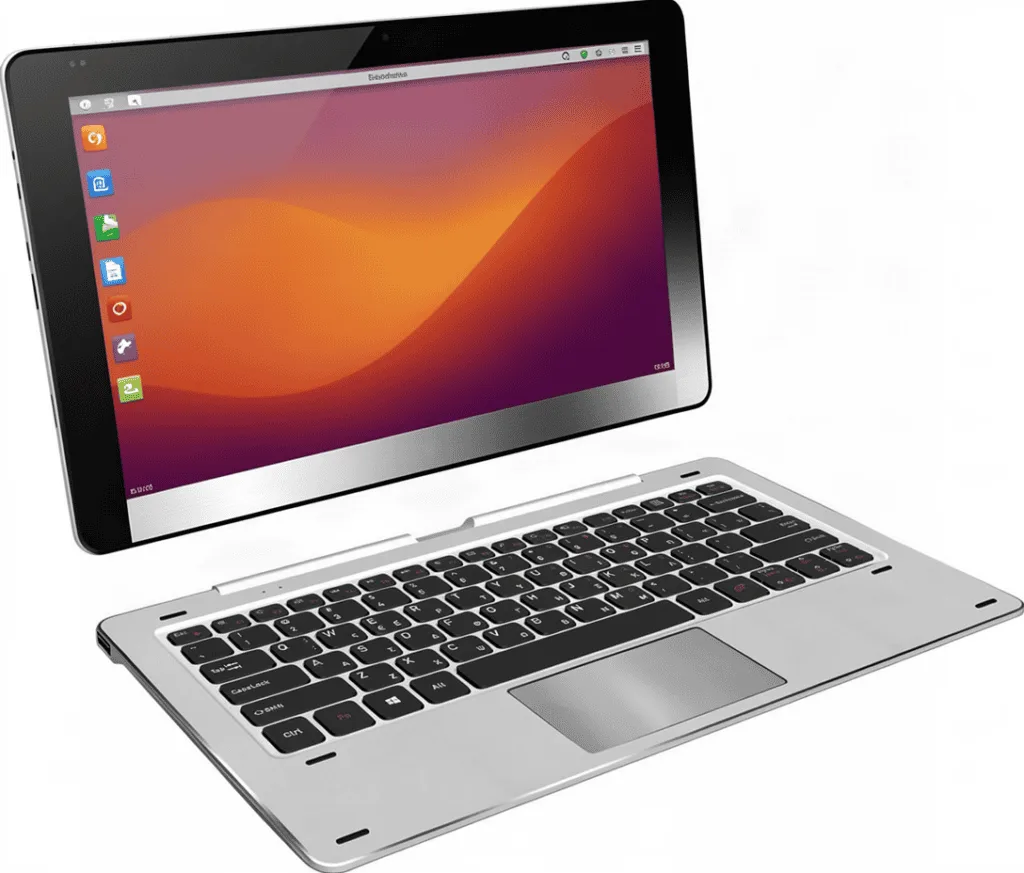
There is a particular kind of optimism in keeping a 2016 tablet in a drawer for five years. It is not hope, exactly. It is the refusal to be the person who threw away something that still switches on.
This one is an MLS Magic 11.6 — a rebadged Chuwi SurBook, if you go looking. An 11.6-inch touchscreen, a keyboard that snaps on magnetically and folds back to make a stand, an Intel Atom processor, 4GB of memory and 32GB of storage. It shipped dual-booting Windows and Android 7 — and Android 7 stopped receiving security updates years ago, so half the machine had been dead weight long before the other half gave up.
Then, after an Ubuntu install a while back, it did this: the Ubuntu splash, a spinner, and a grey screen with a sad-looking monitor on it — Oh no! Something has gone wrong. A problem has occurred and the system can’t recover. Nothing else. Ever again.
It went in a box. On Saturday it was going in the bin.
What follows is how it got out of that box, and it is worth being clear from the start that this was not a solo job. There were two of us: me, at the machine with my hands on it and my eyes on its screen, deciding what was worth attempting — and my AI assistant, working from my home server over the network, doing the reading and the reasoning and most of the typing. One of us could touch the hardware. The other could hold nine thousand lines of system log in its head at once.
Neither of those is much use on its own. Together they got a dead laptop running again inside a day.
The device
Worth a moment on what this thing actually is, because its limitations shaped every decision that followed. Four gigabytes of memory, soldered in place. Thirty-two gigabytes of storage, also soldered. A high-resolution touchscreen, and a keyboard that carries the touchpad and detaches entirely.
No memory slots. No drive bay. Nothing you can open up and upgrade. Every repair on this machine had to be a software repair, because there is no other kind available on it.
Ten years apart, same machine.

The first idea was wrong, and my assistant said so
My instinct was the obvious one: plug it into my desktop with a cable and read the disk from there.
The answer came back flat. No — and here is why, because it is the assumption most people start with. On a machine like this the storage is not a removable part; it is a chip soldered straight to the board, and nothing presents it to you as an external drive. And even if it did, a computer that cannot start itself cannot hand its files over to another computer. The file-transfer mode everyone knows needs a working operating system on the device to serve those files, which is precisely the thing that is missing.
A machine that cannot boot cannot be read from the outside. So the job was not reading it. The job was bringing it back to life.
That is the first place the division of labour showed itself. I was ready to reach for a cable because that is what you do with a broken computer. It had already worked out that the cable could not help, and why, before I finished untangling one.
The screen was lying to us
The next correction was bigger, and it is the most useful idea in this post.
I described what I was seeing: grey screen, sad monitor, nothing works. The response reframed it entirely. That screen is not a dead computer. It is a computer that started perfectly and then failed at the very last step — drawing its desktop. Underneath, everything else was running: the system had loaded, the networking was up, the disk was fine. There was a whole working computer sitting there with no way to show itself.
There is a hidden, text-only view of a Linux machine that you can normally reach with a keyboard shortcut. I tried it. Nothing happened. I tried it again. Nothing. By the third attempt I had a growing suspicion that the machine was simply beyond saving.
The reason turned out to be the keyboard. On this one, the top row of keys is media first: volume, brightness, playback. The shortcut only works if you hold a second key down at the same time — a modifier that changes what that row does. Nobody would guess that from a screen with no instructions on it, and I could not have worked it out from the screen in front of me, because the screen was the broken part. What I could do was press keys and report exactly what happened each time. That is the pattern for the whole day: it reasoned, I acted and observed.
Getting the evidence out of a machine that can’t show you anything
Now I had a working text prompt on a machine with a broken screen, which is a strange place to be. I could type. I could not read. The system keeps an enormous log of everything that happens to it — thousands of lines — and my only way to share it was to photograph a small screen with my phone.
The solution was elegant, and I would not have thought of it. The system itself has a built-in way of pushing a file straight down a network connection, treating the connection itself as though it were a file on the disk. It needs nothing installed, no browser, no file-sharing software, no working desktop — just the computer and the network it is already on.
My assistant set up a receiver on the home server, gave me a single line to type, and 1.2MB of system log — nearly ten thousand lines — arrived in one go. I ran the command. It read the whole thing.
This is where the two-halves thing stops being a slogan. I could not have read that file. It could not have produced it.
Everything pointed at one broken file
The log told the story, and it told it in a single pass.
Inside it were 839 records of the same crash. Not similar — identical. Every one of them inside the same small piece of audio software the system uses to play sound. And the desktop itself depends on that same piece, which is the whole answer: it was not just the sound that was failing. The desktop had been dying because the sound system was broken.
I had two guesses before that, and both were wrong, and I want to be honest about it because the wrong guesses are where the work actually happens. My first was the graphics chip — these small Intel tablets have a difficult reputation. My second was that the storage was full. Neither was the cause. The assistant had the same two suspicions, tested both against the evidence, and dropped both when the evidence did not support them.
The proof came from something quietly clever. Every installed file has a fingerprint recorded at the moment it was installed — a short code that identifies its exact contents. The damaged file’s fingerprint did not match the recorded one. It had been quietly corrupted since February 2025, crashing three different programs every few minutes for months, and nobody had ever seen the error because the crash log was on a screen that could not display it.
Replacing the file stopped the crashes dead. One damaged file had been posing as a dead laptop.
The right tool for old hardware
With the desktop working, the second problem became obvious, and again it was a judgement call rather than a bug hunt: the standard Ubuntu desktop was using a quarter of the processor while doing nothing at all. That is not something to fix. It is the wrong tool for a 2016 processor with 4GB of memory.
I made the call — a lighter desktop called Xubuntu, which is the same Ubuntu underneath with a fraction of the overhead — and the assistant did the installation and the switch-over. It also made a mistake here worth recording, because it owned it immediately: it started the new desktop before properly stopping the old one, so the two of them fought over the machine and the new desktop crashed on the spot. A few minutes of thinking we had broken it. It caught the error, explained it, corrected the order of operations, and carried on.
Then the machine updated itself properly for the first time in years: more than six hundred packages, and the core of its operating system moved forward a full generation — on ten-year-old silicon. It booted.
The second corruption, and the honest part
This is where the machine stopped being merely old.
Installing software suddenly stopped working, with an error about a small internal record being malformed. The obvious explanation is a file that got cut short — an interrupted save, a power cut, something ordinary. It was not.
The file was exactly the right size. Every byte was there. But the contents were fragments belonging to a completely different program — text that had no business being anywhere near it. We rebuilt the file from scratch and got a file of the same size again, with the correct contents this time. Same length, entirely different data.
That is not a file that got truncated. That is a file that had a page of somebody else’s memory written into it — and it had been sitting there like that since April 2025.
The second time in three months. Meanwhile the storage itself reports nothing wrong at all: the flash memory inside it has used barely a fifth of its rated working life, and the filesystem logs no errors whatsoever. Which points not at the disk but at the memory — because failing memory corrupts data before it ever reaches the disk, and leaves no trace behind.
So we did not declare victory. The machine now runs a memory test overnight before it is given anything that matters. Two silent corruptions in one box is a pattern until proven otherwise, and the honest verdict was working, but not yet trustworthy.
The cleanup, with real numbers
Then the tidy-up — and a couple of lessons about disk space that were got wrong before they were got right.
- Downloaded installation files: 211MB of leftovers cleared down to almost nothing.
- System logs: trimmed from 114MB to 46MB.
- Crash reports: cleared entirely, including a large one from the day the desktop kept dying.
- The cache that looked like 6.5GB of easy money: it was not. Those files were simply second names for the same data already stored elsewhere, so the disk was counting the same thing twice. The genuinely recoverable part was under half of what it first appeared.
- The heavy desktop, removed: 148 programs. The estimate beforehand was between one and one and a half gigabytes; the reality was 400MB, because most of what makes a desktop heavy is shared code that the lighter one needs too.
- Free space at the end: 5.8GB before, 6.3GB after.
The part I want to point at is not the numbers. It is that when a big removal was proposed, it did not simply run it. It put a guard in front first: protect the graphics and networking pieces the machine actually needs, generate the full list of what would be deleted, and refuse to continue if anything important appeared on it. The first attempt stopped itself on two false alarms. It adjusted, re-checked, and only then let it run.
My role in that was to say yes or no. It was never to say yes and hope.
The one thing that beat us both
The machine’s own firmware will not remember which system to start. Every single time you switch it on, it forgets, and goes back to offering Android first — the half of the machine that has been useless for years. It is not the small battery that keeps the clock running; the clock is accurate to the second. It is simply a stubborn piece of the machine’s most basic software.
We tried to fix it properly. It did not work, and it briefly made things worse before it settled. So the practical answer is: at startup, choose Ubuntu from the menu. Ten seconds, once a week, on a machine that otherwise works perfectly.
Some fights are not worth winning, and knowing which is which is a judgement call rather than a technical one. That one was mine.
What it is now
A light, modern Linux desktop on hardware from 2016. Every piece of it works: the high-resolution screen, the touchscreen, the keyboard that snaps off and its touchpad, wifi, sound. It can be reached remotely from my desktop for maintenance, and it has 6.3GB of free space to work with.
It is ready for either life now — a small desk machine, or an extra computer in the home lab.
How the two of us actually worked
Since the point of this post is the collaboration rather than the laptop, here is the honest anatomy of it.
What my AI assistant brought. It held the entire system log at once, and did not lose the thread across a session that ran most of a day and involved several restarts, two separate corruption problems and one completely abandoned theory. It checked its own claims instead of asserting them: comparing a file’s fingerprint against the official record rather than assuming, counting what was really on the disk before trusting a storage figure, printing a list of what would be deleted before deleting anything. When it was wrong it said so immediately and without being asked — four times, including the two wrong theories and a memory of how much space a cleanup would free that turned out to be three times too optimistic. And it refused an instruction that would have cost more than it returned.
What I brought. Hands and eyes, exactly as I had described my role going in. I powered the machine on with ten-second presses when it sulked. I pressed keys and reported precisely what each one did, which is the only reason the keyboard trick was ever found. I photographed screens when a photograph was the only output the machine could produce. I made every consequential decision — wipe this, keep that, stop here, carry on — and I am the one who carries the consequences of those decisions. And I supplied the judgement that no log contains: that a machine this old was worth a Saturday, and that a stubborn startup menu was not worth another evening.
Neither half was sufficient. An assistant with no hands can read a log but cannot press a key on a keyboard it cannot reach. A human alone at that console would probably have given up at the third failed attempt and reached for the bin. What made it work was not that either of us was clever. It was the loop: it proposes, I act, the machine answers, and we both look at the answer honestly — including when the answer says we were wrong.
The thing I did not expect is how much of the collaboration was about restraint. Every destructive step waited for my word. Every claim arrived with its evidence attached. The real risk in this kind of work is not technical: it is a machine that sounds confident, and a person who stops checking. Having a partner that showed its working, and stopped at the edges, is what made it safe to keep going.
What a 2016 tablet is actually good for
Being honest about this part saves disappointment later. Four gigabytes and a 32GB disk will never be quick, and no amount of tuning changes that.
- A wall or kitchen touch panel. A good screen, capacitive touch, always on, sipping power. This is the job the hardware is genuinely good at rather than merely capable of. Snap the keyboard off and it is a panel.
- A small home server. It already runs the software that manages small services, so this is one step from working.
- A retro games handheld. The built-in graphics handle the classics — SNES, Genesis, PlayStation — comfortably. Keyboard off, and it is a passable handheld with a very good screen.
What it is not good for, until the memory test passes: anything where a silent error matters. Not the thing that runs your home network, not backups, not your passwords, not anything you rely on to tell you the truth about the rest of your systems.
The verdict
The machine was never “old and useless”. It was one damaged file, and a desktop that was too heavy for the hardware it was running on. Both were fixable, both are fixed, and the whole thing cost one Saturday and nothing else.
Ten-year-old hardware with 4GB of memory is still going to be slow. But slow and unusable are different words, and only one of them belongs in a bin.
And a final note on the other half of the story, since it would be dishonest to write this as though the machine diagnosed itself. A great deal of what is in this post — the crash analysis, the fingerprint check, the memory-corruption finding, the guarded removal list — is work I did not do and could not have done in the time available. Working alongside something that reads faster than I do, shows its evidence, and says when it is unsure, turned a machine I had written off into something running on my desk.
Five things worth knowing
- That grey “something has gone wrong” screen almost never means a dead computer. It usually means the desktop failed to appear. The machine underneath is often perfectly healthy — and it will tell you so, if you can find a way to listen.
- Before you reinstall anything, read the machine’s own log. It is rarely vague. Ours named the culprit 839 times before we looked.
- A corrupt file can be exactly the right size. Comparing it against its official record takes seconds and separates a broken program from broken hardware — which is the difference between a repair and a replacement.
- On old hardware, the desktop matters more than the brand. A lighter desktop is the same operating system at a fraction of the cost.
- Keep the previous version of the system’s core when you upgrade. It takes 100MB, and it is the only thing standing between you and a very long evening.